


Docker - Fundamentals and Getting Started
- Amit Dhanik

- Jun 15, 2021
- 11 min read
Updated: Sep 9, 2022
Hi peoples!! Today We will discuss Docker and how you can get started with it. What was the need for Docker in the first place and why should you get familiarize yourself with it. Let's get started.
This is a beginner-friendly post and would easily be understood by anyone who has not heard of Docker even once. There are many great in-depth articles on Docker, you can refer to them also after reading this if you want to broaden your knowledge.
So first, lets us go back to our school days and learn about some basics of the Infrastructure on which a Computer system works(This is important!)
Hardware
At the core level, we have our Hardware. Hardware can be considered as the basic building block of a computer system. It is a physical component of a computer system consisting of a Keyboard, Mouse, Printer, Scanner, etc (External Hardware) and Motherboard, RAM, Video card, Processor, etc (Internal Hardware). Without Hardware, there would be no computer and no use of the software.
Application Softwares
Software is nothing but a collection of codes designed to give a certain output when installed on our Hardware Machines. All Softwares make use of hardware to run such as Computed Processor(CPU), Memory(RAM), and other hardware devices. Application Softwares are made keeping in mind the Operating system they will run on.
System Software(Operating System)
An Operating system is like an interface that allows both User and the Software to interact with the Hardware. All computer-like systems run on an O.S.(Mobile is a computer-like system) For eg- The main Operating system for computers are Windows, Mac-OS, and Linux(you already know). Similarly, for Mobile, we have Android and IOS Operating Systems.
Whenever you install software on your hardware(mobile, computers), it is clearly mentioned the Operating System it supports and the version of the software. Though today we have Softwares which are readily available for both Windows and Mac-OS, still there might be some software designed to work with a specific Operating System only (just for Windows (Microsoft) or just macOS (Apple)).
Here is a nice diagram of all three layers for better understandig.

Now, let's go over our Infrastructure which was being used till now(is still used) by tech corporates all over the world, and what were the main problems developers and other teams were facing from this infrastructure. What was the need for docker systems and how they overcame these Traditional Infrastructure problems?
Traditional Infrastructure(Used before Docker)
As mentioned above previously, we used to have our Hardware and on top of that, we have our Operating System installed(you might work on Linux, Windows, or Mac-OS). When we deploy our applications, we have libraries of that application and the dependencies which come along with it. For eg- If you want to run the Tomcat server, you also have to install the JDK along with it. This is similar for all the applications/software's that we install on our O.S. Look at the below Diagram. Can you think of any drawbacks to this architecture? On top of our O.S, we have installed our application software. What might be the bottleneck here?

Drawbacks of Traditional Infra and Why Docker?
1. Installation and Configuration - Since we have multiple environments working as a part of a project (Development, Testing, Production), we need to install all the applications and libraries with their Dependencies across all the environments. This is a time-consuming process and leads to a lot of unnecessary hassle. (versions must be same, frequent updates, patches, etc)
2. Compatibility and Dependency - Since O.S upgrades are frequent, the libraries and dependencies also might change depending on the O.S and this causes a big issue. Because the Development team might have developed code on one version, and the Testing team might be using an upgraded version, the result is not as expected, which leads to a lot of jitters and errors. (shots fired from both sides -blame game of course!!). Having the same set of libraries and dependencies was preferred by all, so as to increase efficiency and not get errors due to different versions.

cc: Great Learning
3. Scaling and Managing of applications - In the traditional infrastructure, we had physical machines where applications were deployed. As the traffic increases due to demand and surge, it became very difficult for our applications to maintain or scale up when huge traffic is witnessed suddenly. Eg - Consider a startup that has been working on physical servers and is now witnessing a huge rise in demand. If they are working with only one or two physical servers, it is bound to crash!!

This also leads to Inconsistency across the Environments as it becomes hard to track changes across Dev/QA/Prod and leads to contradiction across all the environments.
Here comes Docker -
Docker is a tool that helps in developing, deploying and executing softwares in isolation and is installed on top of the Operating System. With this, we only install the applications once and after successful deployment, we can package the code in a container and leverage it across all our environments. No need to separately download, install the libraries and applications and run afterwards. Docker makes it a one time work, making it impossible to have inconsistencies as all environments will have the same image and thus, saves our efforts and precious time.Docker-based Virtual Machine can be scaled out easily, thus removing the need of adding extra physical servers.

We will discuss Docker later, but lets us first understand from the architecture what changes Docker brings in?
On top of our Operating System, we install Docker and then run Containers. Each container will have its own applications with libraries and Dependencies.
Container= Code + Libraries.

cc: Great Learning
Once, we have installed our application across the containers, we can package and use them in form of Docker images across all the environments. This diminishes the conflict between teams saying "It worked on my dev server but not in test server" since each team has the same package of container now. This removes all the compatibility issues that we might have faced earlier. Containers are easily portable and secure, and allow you to replace or upgrade one without affecting other containers. Docker also supports rapid scaling, fulfilling criteria for sudden surges in demand. Now you know why Dockers are getting popular and being used everywhere. This is what you needed to know!!

cc: Great Learning
Virtual Machines - Alternate Reality?
Let's install Docker on our machines. Here, I am going to demonstrate it by installing docker on CentOS which I have installed on my Virtual Machines. Wait, but what is this new machine now? Why not directly install docker on your current O.S.? Let's discuss first what are Virtual Machines and their uses. I have provided a link below if you want to deep dive and learn about them. (find that link!!)
What are Virtual Machines?

Virtual Machines are just similar to a computer having CPU, Memory, and disks to store your files. The only difference is that your computer is physical hardware, while a VM can be thought of as a virtual computer within physical servers. What?? In layman language, you borrow dedicated amounts of CPU, memory, and storage from your physical computer or from a remote server. Wow, why would I do this setup in the first place??
Virtual Machines provide you flexibility. Suppose you wanted to try out a New O.S. on your Windows-based O.S. You can use VM's to install that O.S. and try it out without having the need to install it on your computer. This makes it possible to run Linux VMs, for example, on a Mac-OS, or to run an earlier version of Windows on a more current Windows OS. You can test, experiment or even learn about any O.S without having any fear. You can run Softwares that were build only for a specific O.S. Cool, isn't it? So, I will start with installing a Linux O.S on my VM, as I have to have mastery over that O.S. while working on my windows sideways(goes to sleep :D). After that we will deploy our Docker on Linux O.S.
Virtual Machines with Docker
Containers and VMs are used together to provide a great deal of flexibility in deploying and managing apps. Since I have a Windows O.S, and I want to run all my project-related applications on CentOS(so I don't mess up my office-related work on windows ), I will install a VM on my Laptop and install CentOS on top of it. Then we are going to install Docker on my CentOS operating system and create our containers. We can also run multiple Docker containers on a single VM !!
For all of those who are thinking about what the architecture might look like, it looks like this. Remember - Containers virtualize the Operating System, while VM virtualizes the Hardware (extra Gyan).

Note- You don't have to install a VM to run Docker. You can simply type Docker for Windows(Docker Desktop)/Mac-OS or whatever O.S you wish to run on. I simply wanted to run it on CentOS, because I have never tried CentOS. Hence, instead of installing CentOS on my physical machine(which is a headache), I decided to install it directly on a Virtual Machine. You have no obligations to do the same unless you want to follow me and learn a bit about CentOS and VM's. (Be your own hero! )
Still, if you want to follow -
You can download a Virtual box simply by going over here (https://www.virtualbox.org/).
You can download Centos minimal ISO here
You can then Install CentOS on your Virtual Box.
Once the O.S is set up on your VM, you can log in with your credentials, see the IP(ip a) of your machine, and connect to it via SSH(using putty) so that all of your operations can be performed easily from putty rather than doing from Virtual Box window.

Docker Architecture
Finally, we are here!! Let's start discussing.
Docker, as you might have understood till now, is nothing but a tool used to automate the deployment of software along with their libraries and dependencies in lightweight containers across different environments so that there is consistency in codes. The containers then help different environments to work efficiently across all teams such as Development, Testing, and Production. Here are some features of Dockers(interview m puchenge) -
Easy and faster configuration
Application isolation
Security management
High productivity
High scalability
Infrastructure independent
DOCKER FILE
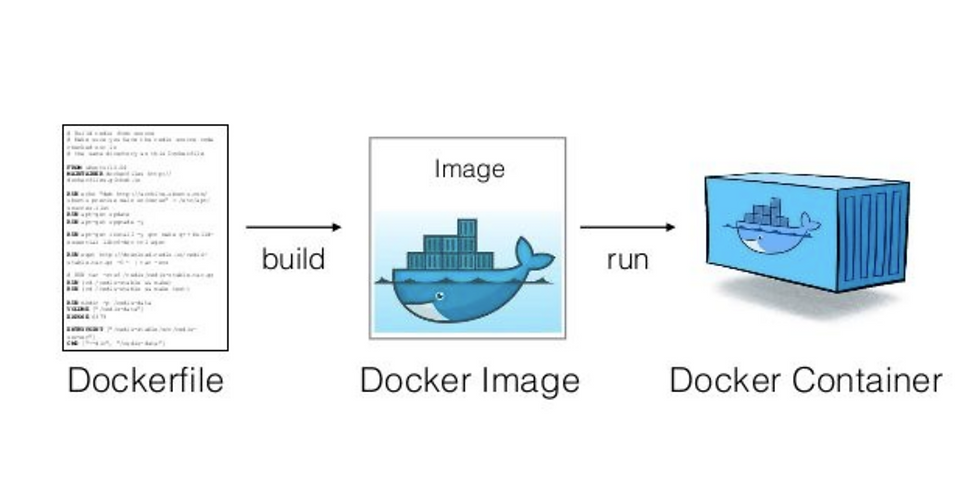
A docker file is a text file which contains instruction to create an image. We can build the docker file using the docker build command. We can then create our container from the docker image using the docker run command.
Note - We can download the image directly from the docker hub or create our own image using Dockerfile. Here, I have created a Dockerfile that installs in OpenSSH-server on my Centos and creates a remote user and gives access to that user. We have to make use of ssh-keygen here to generate a password here for our remote user(remote-key.pub).

Note 2 - Since our image does not exist yet, we have to update our docker-compose.yml file as well. The Context here tells where our Dockerfile is located(inside the centos7 directory). Then we can run the command - docker-compose build and our image will be ready. docker-compose up -d makes our container running.

After our image is successfully created, we can push this docker image to the docker hub. From the docker hub, any team can pull the image and create containers across different environments( Testing, Development, Production)

DOCKER IMAGE
Docker Images - A docker image is a read-only template with instructions for creating a Docker container. When these instructions are executed(written in Dockerfile), it creates a Docker container. A container consists of the application as well as everything that is required to run the application. You can see some of the docker images that I have created.

The file in which the instructions are mentioned is called a Dockerfile(remember you have to write instructions for creating a docker image). Dockerfile consists of specific commands that guide you on how to build a specific Docker image. When these are executed, the images become containers at runtime.
Eg 1 - We can download Jenkins image just by a simple pull command. It is that easy to spin up a service !!

Eg 2 - Here, we have defined Dockerfile for installing the Mysql. You can simply type docker Mysql image on google and you can pull it from docker hub.

If you want some additional configurations to be downloaded then you have to do more modifications to your docker file. See the eg below of full-fledged Dockerfile.
Note- Here I have installed Ansible using Dockerfile.

As soon as we run this file, Docker will pull the ansible image from Docker Registry and we will have our image. We can then run our image, and the runnable instance of our image is called a container inside which we can create inventories and groups(used for ansible). You might be thinking what is a docker registry and where does docker pull all these images from? A docker registry stores Docker images and it is a public registry that anyone can use. When we use docker pull, the required images are pulled from our configured registry. Docker looks for images on the docker hub by default, just like you can push and pull repositories from Github. Similarly, we can also push our Docker image to the Docker hub/registry.
Some Important command which you might use for your Dockerfile
FROM - Tells about the source
PULL - Adds file from docker hub
RUN - Builds your container
DOCKER COMPOSE
Since you will always be working with multiple containers, docker-compose is a tool that is used for defining and running multi-container docker applications. The format of the docker-compose file is YAML, i.e. docker-compose.yml. We run our docker-compose.yml by using the command docker-compose up -d and bring the application down by using docker-compose down.
Here is an example of the docker-comose.yml file.

DOCKER CONTAINER
A Docker container is a lightweight unit that packages the application code along with all of the dependencies. It is a runnable instance of an image, i.e. images become containers when they run on Docker Engine(executing the Dockerfile). We can create, start, stop, and delete a container using the Docker API. We have a Docker Host inside which we install our Docker Demon. The Docker Daemon listens for all the Docker API Requests and it manages all the Docker Objects such as images, containers, networks, and volumes.
Docker file -----> Docker Image --------> Docker Container
Docker file - build using docker build -t <image name><loc of docker file>
This will create our docker image. When we run our docker image using - docker run -it -d --name <container_name> <name of image>
Some Basic Commands to get you started
docker images -- used to view the images you have downloaded on your Docker
docker build -t <name of image u want to create> <loc of your docker file>
Eg - docker build -t ubuntu-python . Here t stands for tag and the dot represent the current directory.
docker run -- To run the images as a container. ( e.g. - docker run --name Jenkins -p 80:8080 -d image_name) - Here, Jenkins is the name of the container, and 80 is the local port while 8080 is the container port.
docker ps -- shows the list of running containers
docker ps -a -- shows all the stopped containers
docker ps -a -q -- gives you the container id (which is only needed for starting the container)
docker logs <name-of-container> -- check the logs of your container
docker start <container_name> -- starts your container
docker stop <container_name> -- stops your container
docker exec -it <container_name> bash -- Connect to container Terminal (e.g. -docker exec -it Jenkins bash)
docker rm <container_name> -- removes the container(cannot remove a running container)
docker rmi <image-id> -- remove the image. You can get an image-id using docker images.
Just Remember - With Docker, you Build Once and Deploy Unlimited times!! If it works in one environment, it will work in other environments as well. Every application works in its container and does not interfere with other applications.

Additional Information - Kubernetes
If you start working with Docker, you probably will not work only on one container, you will have lots of containers!! How do you manage all these containers? I mean to say that if a container dies, or if you want the container to scale or do load balancing, monitoring, rollback, etc, how will you manage all these with hundreds of containers? If you do it manually, it will give you a bad headache. That is where Kubernetes comes in, which Google open-sourced in 2014. Kubernetes manages all the containers by itself, hence it is popularly known as Container Orchestration Platform. The Collection of these containers is referred to as Pods in K.B. Kubernetes helps you to manage deployment, autoscale, and load balance containers easily. (It does more than this!!)
I will also be writing a new article - Kubernetes Fundamentals - Beginners Guide, which will help you get started with K.B. Stay tuned!!
I hope you all found the post useful and start using Docker services as well. If you have any queries, you can always reach out to me. Feel free to provide your feedback in the comment section. Leave a like if you enjoyed reading. Thanks !!
Connect with me on LinkedIn - Amit Dhanik


Comments